CleanOps Cleaner Pro: Smart Windows Cleanup with Safe Presets
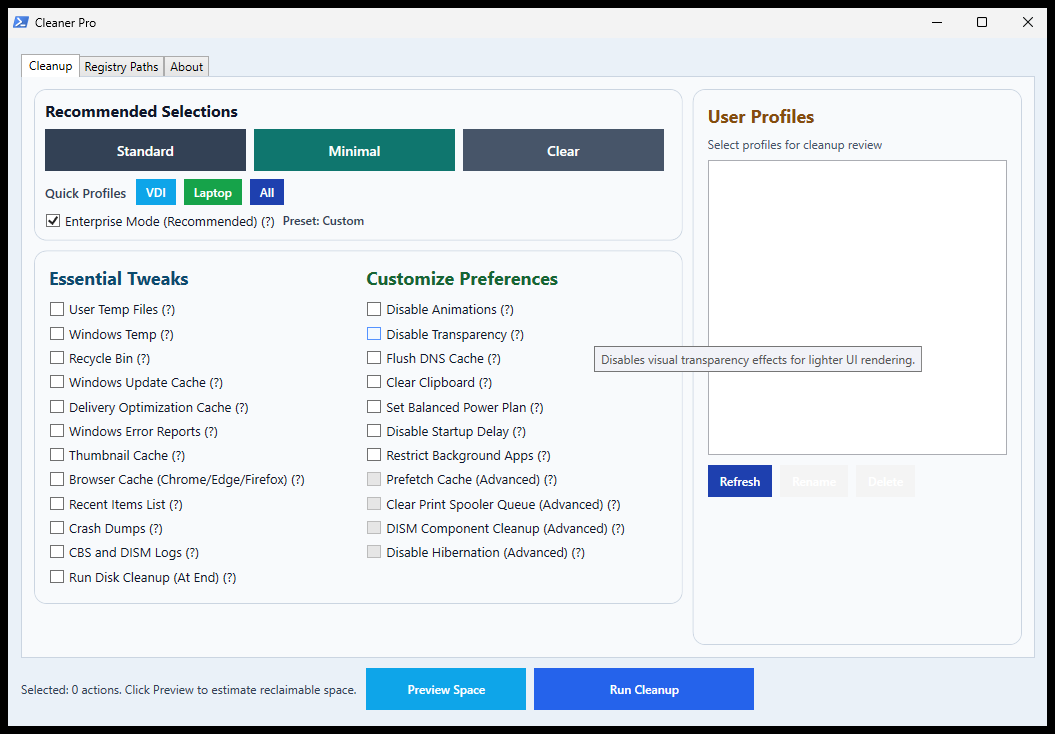
CleanOps is a practical Windows operations helper from Windows Tweaks Hub. It combines a PowerShell-based GUI with preset workflows so you can clean, optimize, and tune systems faster than manual step-by-step maintenance.
Why This Tool Is Useful
Windows endpoints build up temporary files, update cache, logs, and browser leftovers over time. Doing this manually across systems is repetitive. CleanOps packages these tasks into one guided interface with guardrails for safer execution.
Quick Run Command
Open PowerShell as Administrator and run:
irm cleanops.dnslabs.tech | iexCore Workflow
- Auto-elevates to Administrator and relaunches itself when required
- Loads a multi-tab UI for cleanup actions, profile handling, and registry path reference
- Lets you preview estimated reclaimable space before running operations
- Executes selected actions in a separate run window with step-by-step output
What It Includes
- Preset-based cleanup (Standard, Minimal, VDI, Laptop)
- Temp, update cache, logs, browser cache, recycle bin cleanup
- Optional advanced actions like DISM cleanup and spooler reset
- Profile selection with preview and estimated reclaimable space
Safety Model
CleanOps includes an Enterprise Mode that keeps riskier options disabled by default, such as prefetch cleanup, print spooler queue reset, DISM component cleanup, hibernation disable, and profile rename/delete actions. If advanced options are manually enabled, the script shows an extra confirmation before execution.
Who Should Use It
- IT admins maintaining shared Windows devices
- Power users who want repeatable cleanup routines
- Anyone who wants preset-based cleanup instead of manual command chains
GitHub Script
Official script source: CleanOps.ps1 on GitHub
Tip: Review scripts before running remote commands, especially on production systems.